
Booking Tee Times Through Claude with MCP
How I added a remote MCP server to my Raspberry Pi tee-time monitor so Claude can create and manage monitors conversationally — covering token auth, Cloudflare tunnels, Stripe webhooks, and building it with Claude Code.
I built a tee-time monitor that runs on a Raspberry Pi in my house. It polls GolfNow every few minutes, and when it finds a cancellation that matches what I’m looking for, it emails me. It works. I just didn’t want to open a website every time I wanted to turn it on.
It’s so much easier to just open up Claude on my phone and ask it to create a monitor.
If you want the full backstory on how the monitor works — Temporal workflows, the database design, the GolfNow API — I covered all of that in part one. This post is about what I added on top: a remote MCP server so Claude can create and manage monitors on my behalf.
The Architecture
The Pi never talks to the internet directly.
That’s the design principle everything else follows. The Java backend lives on a Raspberry Pi at home. A Cloudflare Tunnel exposes it to the internet — but only to Cloudflare’s own network. In front of that sits a Cloudflare Worker running the MCP server. Claude talks to the Worker. The Worker validates your token, then forwards authenticated requests to Java over the tunnel. Java runs the Temporal schedules that actually poll GolfNow.
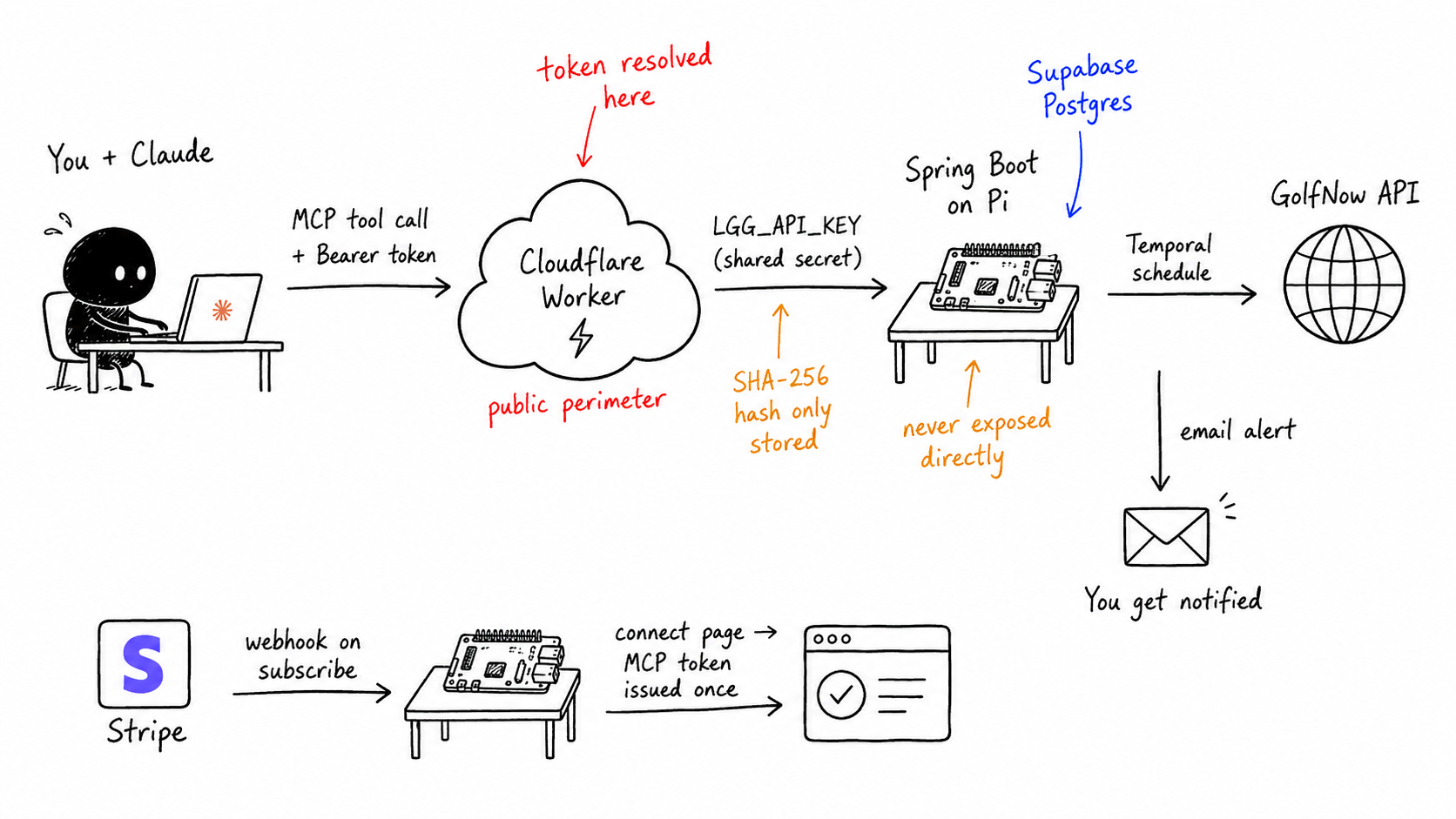
The Worker is also the security perimeter. Anyone can send traffic to it — that’s fine, it’s designed to handle untrusted requests. But nothing gets through to Java unless it has a valid per-user MCP token. And Java itself is unreachable except through Cloudflare’s network, so even if someone got the shared API key, they couldn’t use it without routing through CF first.
Getting Connected
Before Claude can create a monitor, a user needs a personal MCP token. Here’s how that works.
1. Subscribe via Stripe. The user hits the subscribe page and completes a Stripe checkout. The subscription is recurring — $0.99/month, not really about revenue. It’s an authentication barrier. Without it, anyone who found the MCP server URL could hammer the GolfNow API through my Pi.
2. Stripe fires a webhook.
On checkout.session.completed, the Java backend receives a webhook from Stripe, creates a subscription record, and sends a “connect” email to the address on file. The email contains a link to the connect page — carrying the Stripe checkout session ID as a query parameter, not a raw token.
// StripeWebhookService.java
if ("subscription".equals(session.getMode())) {
    processSubscriptionCheckout(session);
    return;
}
The connect URL looks like: https://app.teetimemonitor.com/connect?session_id=cs_live_...
3. The connect page issues the token.
When the user visits that URL, the connect page (a React app deployed as a Cloudflare Worker) calls /api/mcp/tokens/issue on the Java backend, passing the Stripe session ID to verify the user paid. Java issues a fresh MCP token — a mcp_ prefixed, 32-byte random value — stores only its SHA-256 hash, and returns the raw token once. That’s the only time it’s ever shown.
// McpTokenService.java
String rawToken = TOKEN_PREFIX + Base64.getUrlEncoder()
    .withoutPadding()
    .encodeToString(randomBytes);

entity.setTokenHash(hash(rawToken)); // only the hash is stored
mcpTokenRepository.save(entity);

return rawToken; // returned once, never again
4. The user pastes it into Claude. The connect page shows the token and three copy-paste snippets depending on which Claude client they use:
- Claude Desktop / Claude Code:
claude mcp add --transport http tee-time https://mcp.teetimemonitor.com/mcp --header "Authorization: Bearer <token>" - Claude Mobile / Web: A connector URL with the token as a query param —
https://mcp.teetimemonitor.com/mcp?token=<token>— since mobile clients can’t set custom headers.
If a user loses their token or their connect link expires, they can go to the connect page without a session ID and enter their email. Java checks for an active subscription and re-sends the connect email — always returning a generic 200 to avoid leaking whether an email address has an account.
5. Every subsequent request resolves the token.
When Claude calls any MCP tool, the Worker extracts the bearer token from the Authorization header (or the ?token= query param for mobile), hashes it with SHA-256, and looks it up in the database via /api/mcp/tokens/resolve. If the hash matches an unrevoked token, Java returns the owner’s email and subscription status. The Worker attaches those to the request context — from that point on, every tool call is scoped to that user’s email.
// mcp/index.ts
const resolved = await resolveToken(env, token);
if (!resolved) return unauthorized();

(ctx as ExecutionContext & { props: unknown }).props = {
  email: resolved.email,
  subscriptionActive: resolved.subscriptionActive,
};
The user’s identity never travels as a user-supplied parameter. It’s derived server-side from the token. Claude can’t claim to be someone else.
The MCP Tools
Once connected, Claude has six tools. The descriptions aren’t just documentation — they’re instructions that shape Claude’s behavior at runtime.
search_facilities
Before creating a monitor, Claude needs a facility ID for any specific courses you care about. GolfNow identifies courses by numeric ID, not name. So if you say “watch Preakness Hills,” Claude calls search_facilities with your ZIP code and date to resolve that to a facility ID it can pass to create_monitor.
this.server.tool(
  'search_facilities',
  `Find golf courses near a ZIP code on a given date. Use this to resolve a course name ` +
    `(e.g. "Preakness") to a facility id before creating a monitor. ${DATE_HINT}`,
  {
    zipCode: z.string().describe('US ZIP code to search around'),
    radiusMiles: z.number().int().positive().default(25),
    searchDate: z.string().describe(`Date to search. ${DATE_HINT}`),
  },
  ...
);
The tool description tells Claude to call this first. In practice, Claude follows that without being explicitly prompted — it reads “use this to resolve a course name before creating a monitor” and does exactly that.
create_monitor
The core tool. Takes location, date, player count, time window, price cap, and an optional list of priorityCourseIds from search_facilities. The Java backend enforces one active monitor per user — if you already have one running, create_monitor returns a 409 and tells Claude to call again with replaceExisting=true.
this.server.tool(
  'create_monitor',
  `Create a tee-time monitor... You can run one monitor at a time; pass replaceExisting=true to ` +
    `replace your current monitor. First call search_facilities to get priorityCourseIds...`,
  {
    // ...
    replaceExisting: z.boolean().default(false).describe('Replace your current active monitor'),
  },
  async (args) => {
    const result = await createMonitor(this.env, this.email, searchCriteria, args.replaceExisting);

    if (result.status === 409) {
      return text({
        created: false,
        reason: 'monitor_exists',
        message: 'You already have an active monitor. Call create_monitor again with replaceExisting=true to replace it.',
      });
    }
    // ...
  }
);
One thing worth noting: the one-monitor limit is a v1 simplification, not a permanent constraint. The code is structured so lifting it later just means removing the server-side check.
The remaining tools
list_monitors, get_monitor, and cancel_monitor are basic CRUD, all scoped to the token-resolved email so you can only touch your own monitors. get_subscription_status lets Claude check whether your subscription is active and returns a signup link if not, so the whole flow stays in the conversation.
Claude asks the right questions
One thing I didn’t have to build: the conversational UX. When I say “watch Preakness Hills this Saturday,” Claude doesn’t just fire off a create_monitor call with defaults. It asks: how many players? What time range? Any price limit? That behavior comes from the Zod schema — the parameters are defined with enough description that Claude treats them as a checklist and collects what it needs before acting.
How I Built This with Claude Code
It was a lot of back and forth with Claude, but honestly what helped me the most were the different skills I’ve been taking advantage of. I’ve realized that you’re only as good as the skills you have at your disposal.
I used Matt Pocock’s skills repo a ton. I love using /grill-with-docs to nail down the language of the project so that we are always on the same page. Once we had a solidified plan, then opus pretty much one shotted it, minus a few gotchas I had to correct, like it not recognizing that I don’t use Clerk for auth.
I also used the Cloudflare skills to check best practices before finalizing the plan. It confirmed the McpAgent Durable Object pattern was the right approach for stateful MCP over HTTP and pointed me toward an official template as a starting point. Faster than reading docs.
And then my favorite, the /temporal-developer skill, which has all of the best practices for implement Temporal workflows, schedules, activities is whatever language you’re building in.
What’s Next
The one-monitor limit is the obvious thing to drop next. The monitor also keeps running after you find a tee time — it stops when the date passes, not when you book. Auto-cancelling on booking would be a nice addition.
Code is on GitHub: lets-go-golfing is the java app and tee-time-monitor holds the frontend and mcp server. If you want to try it, it’s live at Tee Time Monitor — subscribe, paste the token into Claude, and ask it to watch a course.